Thursday, October 22, 2015
Nexus 6 battery life: incredible
After the upgrade of my Nexus 6 to Android 6, battery life has increased in an unbelievable manner. When getting home from work, battery is now around 50%. With lengthy phone calls, USB in the car, hotspot in the once in a while. Simply amazing.

Monday, August 17, 2015
Incompatible Metering info (CallerInformation) in SAP WS
The support of SAP systems for SOAP Web Services is pretty good. I have e.g. been successfully using WS-RM and SAP-RM to have reliable, one-way communication.
During a project I needed to make a call from an SAP ECC 6 system towards an external web service. This external web service was secured with WS-Security X509 Token profile. So the payload had to be digitally signed. With no integration platform yet available, I intended to make a direct call from the SAP back)end system. But this really proofed to be impossible. Getting keys and certificates into an SAP system is always a challenge, but configuration of the WS-Security in SAP’s SOAManager is actually quite trivial.
But things did not work out: a real showstopper became the Metering info that was present in each and every outbound call. As of Support Pack 17 of SAP NetWeaver 7.0, the element <CallerInformation> is present in the SOAP header of each outbound SOAP request. Purpose of this element is to gather service metering and transfer it to the service provider.
And the bad news is: you cannot get rid of this Metering information, as clearly documented by SAP Support (SAP note 1239428). The only workaround is to forward the information in the URL of the HTTP call. But in my case, the well secured web service rightfully refused to accept the web service call with all these extra parameters in the URL.
So SAP has implemented an proprietary and incompatible “feature”. Why can’t it be switched off?
Is this a trick of SAP to enforce the use of SAP PI/PO? Obviously any ESB can remove this ugly SOAP header.
During a project I needed to make a call from an SAP ECC 6 system towards an external web service. This external web service was secured with WS-Security X509 Token profile. So the payload had to be digitally signed. With no integration platform yet available, I intended to make a direct call from the SAP back)end system. But this really proofed to be impossible. Getting keys and certificates into an SAP system is always a challenge, but configuration of the WS-Security in SAP’s SOAManager is actually quite trivial.
But things did not work out: a real showstopper became the Metering info that was present in each and every outbound call. As of Support Pack 17 of SAP NetWeaver 7.0, the element <CallerInformation> is present in the SOAP header of each outbound SOAP request. Purpose of this element is to gather service metering and transfer it to the service provider.
  <CallerInformation wsu:Id="part-CallerInformation-2"
     xmlns="http://www.sap.com/webas/712/soap/features/runtime/metering/">
    <m:Type xmlns:m="http://www.sap.com/webas/712/soap/features/runtime/metering/">SA</m:Type>
    <m:App xmlns:m="http://www.sap.com/webas/712/soap/features/runtime/metering/"/>
    <m:Component xmlns:m="http://www.sap.com/webas/712/soap/features/runtime/metering/"/>
  </CallerInformation>
</soap-env:Header>
And the bad news is: you cannot get rid of this Metering information, as clearly documented by SAP Support (SAP note 1239428). The only workaround is to forward the information in the URL of the HTTP call. But in my case, the well secured web service rightfully refused to accept the web service call with all these extra parameters in the URL.
So SAP has implemented an proprietary and incompatible “feature”. Why can’t it be switched off?
Is this a trick of SAP to enforce the use of SAP PI/PO? Obviously any ESB can remove this ugly SOAP header.
Friday, January 2, 2015

Wednesday, December 31, 2014
Devops (3): Chef (and some fun cooking)
After having looked into Vagrant, it became clear that Puppet and Chef are "the" tools to do the structured and repeatable configuration of machines. I picked the recent book "Learning Chef" to learn and experiment a bit.
 Tools
Tools
Note: the tool Ansible does the opposite, pushing configuration data to the machines.
Many cookbooks or recipes can be downloaded from the Chef Supermarket and others.
Finally
After spending some time look around in the world of DevOps and its tools, I have a few general Observations:
- The book uses the recent Chef Development Kit which should gradually replace the tool called Knife.
- The tool "Chef" uses the the Recipe DSL to write recipes (Domain Specific Language, based on the Ruby programming language)
- VirtualBox is used for running the VM's that are going to be cooked and baked
- Complemented with our good friend Vagrant (see previous DevOps blog)(actually kitchen-vagrant)
- Finally the tool kitchen is used
Note: the tool Ansible does the opposite, pushing configuration data to the machines.
Many cookbooks or recipes can be downloaded from the Chef Supermarket and others.
Finally
After spending some time look around in the world of DevOps and its tools, I have a few general Observations:
- Devops is strongly focused on Linux
- Diverse programming languages such as Ruby and Erlang are used
- This is a domain in full flux, new initiatives and companies pop up, things evolve rapidly
- First time I see the file format YAML actually being used
Tuesday, December 30, 2014
Devops (2): Vagrant
 After looking a bit into Docker, I went on to look into Vagrant, another well-known tool to provision and configure virtual machines.
To learn about Vagrant, I read the book "Vagrant: Up and Running". This O'Reilly book is well-written and the examples all work. While doing the exercises on a Windows Server 2012R2 VM, I hardly encountered any problems. Starting the Ubuntu VM with the vagrant up command and removing it with vagrant destory.

The Vagrant command line tool allows to create a Virtual Machine in a reproducible and neutral manner. Vagrant was initially developed around the the free VM product Oracle VirtualBox. But Vagrant now comes with many other providers, e.g. AWS, Rackspace, IBM SoftLayer and Microsoft Azure. Support for VMWare however is not free ($79).
Vagrant focuses on the creation of Virtual Machines in a neutral manner. Contrary to Docker, it uses an actual Virtualization solution to provision the virtual machines. This allows Vagrant to support multiple Operating Systems in parallel. And offers support for automating the creation of Windows based virtual machines.
When Vagrant is used in combination with Oracle VirtualBox, Vagrant will use the VBoxManage.exe of VirtualBox. To create machines with a cloud provider, the respective Vagrant provider will leverage the API and tools of the specific Infrastructure-As-A-Service solution. Vagrant configure all sorts of attributes of the virtual machine, incl. e.g. networking (and port forwarding).
For the actual provisioning of the machines, Vagrant supports many options, including command line. But most often, Vagrant will be used in combination with Chef or Puppet. E.g. the Chef development kit uses Vagrant as its default "driver".
Boxes
Vagrant does not start from an ISO image, but from an already prepared "box". The more such box is pre-configured, the fewer configuration needs to be done afterwards. Vagrant uses its own software format to package the virtual machines that are taken as a starting point (compare to Amazon Machine Images). Vagrantbox.es and many others make pre-packaged Vagrant boxes available,
Windows specific
- VagrantManager makes Vagrant accessible from the Windows (or iOS) Taskbar
- The company modern.IE makes Windows boxes with all sorts of IE versions available.
- Interesting blog on how to create Variant Windows boxes
- Vagrant can directly access the command line of Linux boxes over SSH (secure shell). For Windows boxes this cal also be arranged wen cygwin (or other SSH server) is installed. But Vagrant can also use WinRM to access the Windows command line
- Where the installation of software on Linux boxes leverages apt-get or yum to install software packages, Chocolatery wants to bring a similar solution to the Microsoft world; many packages are available for quick and easy installation
- Boxstarter leverages Chocolatey packages to automate the installation of software and create repeatable, scripted Windows environments.
In my own domain of Application Integration and SOA, I expect that both vendors and customers will pickup tools such as Vagrant for creating and provisioning (virtual) machines. Combined with Chef or Puppet to actually install and configure the software on these machines.
Monday, December 29, 2014
Devops and Docker
The holiday period between Christmas and New Year is an ideal period to catch up on some reading and experimenting. Devops and tools such as Docker, Vagrant, Chef, Puppet and Ansible were on my radar for a while. So finally some time to dive into this topics.
Nested VMs
Not to mess up my machine, I use VMWare workstation to spin up some test machines. As these Devops tools are all about creating and provisioning virtual machines, one must enable "Nested VMs" support. This allows one virtual machine to run in another.

Docker

Docker appeared on my radar while learning about Micro Services. Docker focuses on the creation of light-weight containers in which applications are configured in an automated manner.

The Linux Containers are very small by leveraging OS level virtualization of Linux. Is it some "chroot on rocks". The chroot system call on Unix/Linux changes the root directory for a program and all of its children. chroot allows programs - e.g. a web server - to run in a more protected mode. The OS level virtualization can limit all the resources used by child processes: CPU, memory, disk space, ... Because containers are so light-weight, many of them can be run on a single machine. This mechanism allows each application to run in its own container, its own virtualized OS.
To have a quick try of Docker, there is a great Online Tutorial consisting of 10 steps. Recommended!
As there aren't any books available on Docker, I watched the brand new training material of LiveLessons. As I couldn't find the text material, had to type over the instructions from the paused video. After wasting some time trying to get access the Fedora Atomic container on the Fedora 21 host, decided to switch to another topic, Vagrant. If I have some more time, I'll come back and retry with RHEL as used in the video training. Or switch to Windows and take a look boot2docker.
Nested VMs
Not to mess up my machine, I use VMWare workstation to spin up some test machines. As these Devops tools are all about creating and provisioning virtual machines, one must enable "Nested VMs" support. This allows one virtual machine to run in another.
Docker
Docker appeared on my radar while learning about Micro Services. Docker focuses on the creation of light-weight containers in which applications are configured in an automated manner.
The Linux Containers are very small by leveraging OS level virtualization of Linux. Is it some "chroot on rocks". The chroot system call on Unix/Linux changes the root directory for a program and all of its children. chroot allows programs - e.g. a web server - to run in a more protected mode. The OS level virtualization can limit all the resources used by child processes: CPU, memory, disk space, ... Because containers are so light-weight, many of them can be run on a single machine. This mechanism allows each application to run in its own container, its own virtualized OS.
To have a quick try of Docker, there is a great Online Tutorial consisting of 10 steps. Recommended!
As there aren't any books available on Docker, I watched the brand new training material of LiveLessons. As I couldn't find the text material, had to type over the instructions from the paused video. After wasting some time trying to get access the Fedora Atomic container on the Fedora 21 host, decided to switch to another topic, Vagrant. If I have some more time, I'll come back and retry with RHEL as used in the video training. Or switch to Windows and take a look boot2docker.
Thursday, November 13, 2014
Micro Services - Conway Law and Application Integration teams
"Micro Services" is a new buzzword in world of IT architects. As it talks about application components communicating over a network and contains "services", it probably has something to do with SOA and integration. So I had to look into it.
Let's bulletize the description from the article by Martin Fowler and James Lewis:
- The Microservices architectural style is an approach to
- developing a single application < application architecture
- as a suite of small services, < componentization, no libraries
- each (service) running in its own process
- and communicating with lightweight mechanisms, < over the network
- often an HTTP resource API. < REST, message bus
- These services are built around business capabilities < Domain Driven Design
- and independently deployable by fully automated deployment machinery.
- There is a bare minimum of centralized management of these services,
- which may be written in different programming languages and
- use different data storage technologies < eventual consistency
Conway law - Integration Competence Center
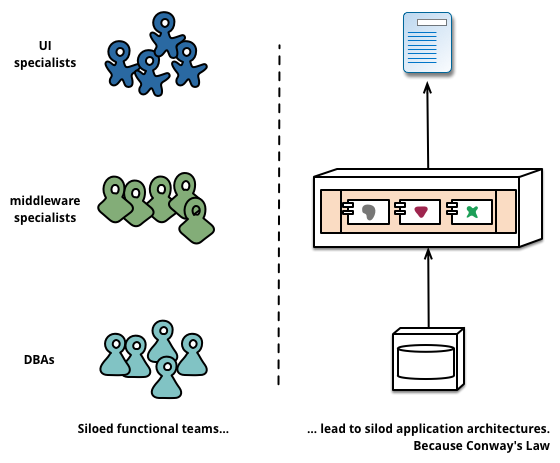
But there was one aspect that triggered me in particular when learning about Microservices: Conway Law: "any organization that designs a system (defined broadly) will produce a design whose structure is a copy of the organization's communication structure".
So this law states that an application architecture will reflect the way an IT department is organized. Microservices advocates refer a lot to it.
 |
| Service boundaries reinforced by team boundaries (picture from article by Martin Fowler) |
For Microservices to focus and align with business functionality, the teams developing (and maintaining) the Microservices should therefore be cross-functional, including the full range of skills required for the development: user-experience, database, and project management.
Orthogonal to the view of the Microservices architects, that Conway Law confirms my personal view and opinion that any IT organization that wishes to leverage a central integration platform to a great extent, requires a separate team developing on and managing that integration platform.
How did I learn about MicroServices?
- The Microservices article by Martin Fowler and James Lewis
- Rough cut version of the O'Reilly book "Building Microservices" by Sam Newman
- Software Engineering Radio podcast episode with Stefan Tilkov
- Software Engineering Radio podcast with James Lewis
- SAI evening session I attended with great presentation by Stijn van den Enden and colleagues

PS: when searching for the term "micro service", I found the term also in the book "Java Web Services Architecture" back from 2003!
Subscribe to:
Posts (Atom)